
What You Need to Record Your First Podcast (Without Going Down the Gear Rabbit Hole)
Disclosure: Article contains affiliate links.
Language teachers benefit enormously from podcasting. A show lets you reach your perfect students and sell them on your personality before they have booked a lesson. But before any of that happens, you need to actually record something.
The internet will happily send you down a six-hour research spiral about microphones, acoustic panels, recording software, and more confusing things.
You don’t need most of that. Here’s what’s most important, as written by a home podcaster with hundreds of episodes under their belt.
The Most Important Thing About Recording
The most important thing about audio is that your listeners can hear and understand you. You want to eliminate echoes, background noises, and any audio hiss.
Get the basics right, and the rest follows.
Your First Podcast Recording Setup
Here is what you actually need to start:
A microphone
Headphones
A quiet recording space
Recording software
A basic editing workflow
An episode plan
That is the full list. Everything else is optional, at least for now.
Microphones

You can start off using a USB microphone, meaning the microphone is plugged straight into your computer.
Make sure your microphone is mounted somewhere stable, ideally on a boom arm or solid stand.
I use a Rode Podcaster microphone mounted on a boom arm, and my podcast friend uses either a Samson Meteorite, or a Zoom H4N recorder which also sits on a boom arm.
If your microphone is on your desk, avoid typing while recording. The vibrations travel through the surface and cause unpleasant noises in the audio.
Once you have been podcasting for a while, you may want to think about dynamic versus condenser microphones, XLR connections, and audio interfaces. All worth knowing eventually. For episode one, a solid USB microphone in a quiet room is genuinely enough.
Headphones
Headphones are essential for podcasters.
First, you want to hear your own voice loud and clear while recording, so you can catch problems before they end up in the finished episode.
Second, imagine you are recording with a remote guest. If you do not have headphones, their voice comes out of your speakers and gets picked up by your microphone. Add a delay to that and your show is very difficult to save in editing.
Your existing headphones are probably fine to start with. When you're ready, a pair of over-ear headphones adds comfort and boosts audio quality.
Your Recording Space
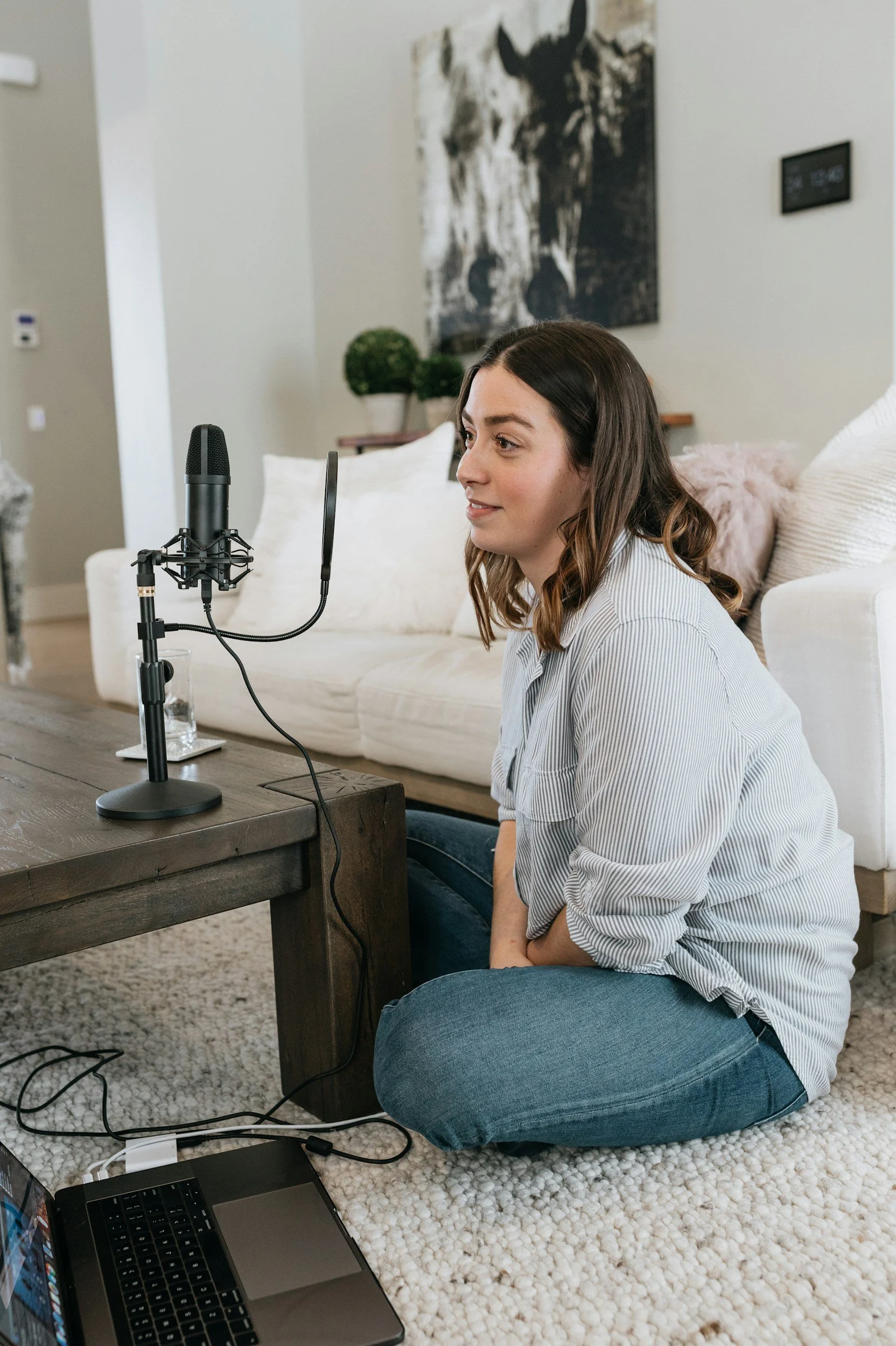
Curtains, rugs, sofas, cushions, bookshelves, and clothing all absorb sound and reduce echo. Recording in a carpeted room with the curtains closed is a simple, free upgrade.
Your room matters as much as your microphone.
Hard, bare surfaces create echo. A large empty room with wooden floors and bare walls will make even a good microphone sound hollow. The fix is easy: Just add more soft stuff!
If you are one of those lucky people with a walk-in wardrobe, try setting up your microphone in there. It sounds absurd, but works remarkably well.
What you want to avoid: hard floors, bare walls, large uncovered windows, and anywhere with a constant hum from a fridge, air conditioning, or traffic outside.
Pop Filters, Boom Arms and Other Extras
These are super useful, but not essential on day one.
You know that horrible burst of air you sometimes hear when someone says a word starting with P or B on a recording?
That is a plosive sound hitting the microphone directly. A pop filter — a simple mesh disc that sits in front of your microphone — softens those sounds and is very inexpensive.
A boom arm or microphone stand keeps your microphone stable and at the right height. Worth having once you are recording regularly.
Beyond that, resist the urge to buy accessories before you have made a single episode. They will still be there once you know what you actually need.
Recording Solo
Most computers already have basic recording software installed (like GarageBand on a Mac), and it is usually enough for a straightforward solo episode.
Record a short test before your first real session. → Listen back with headphones. → Check for background noise, echo, and whether your levels are too quiet or too loud. It takes five minutes and saves a lot of frustration.
Recording With a Guest
If you are recording with someone in another location, things need a little more care.
Both people should wear headphones. Both should be in a quiet space. Do a short audio test before the real conversation starts.
Tools designed for podcast recording, such as Riverside.fm or similar platforms, record each person's audio as a separate high-quality local file. This makes editing much easier and means a connection problem on one side does not ruin the other person's audio.
Ask your guest to close unnecessary browser tabs, use headphones, and find a quiet room. Most people are happy to do this when you explain why it helps.
Editing
Editing is where your raw recording becomes a finished episode.
At its simplest, it means:
Cutting out false starts and obvious mistakes
Removing long silences
Adding intro and outro music if you have it
Improving the sound where possible
Exporting the finished file
You do not need to remove every breath or achieve perfection. You need a clear, listenable episode.
AI-powered editing tools have made this significantly faster. Descript is a particularly good option. It transcribes your audio automatically, and you edit the recording by editing the text, which is far more intuitive than traditional audio editing. It also has noise reduction and audio clean-up built in.
One note from experience: AI tools can improve decent audio. They cannot rescue bad, bad audio. Good recording habits at the start save the most time in editing.
Your Absolute Essentials
If you want a simple checklist before you record your first episode:
A quiet room with soft furnishings
Recording software
An editing tool — Descript is a strong option
A plan for the episode
No one ever started a podcast that was 100% perfect. You might as well give it a try.
Before You Buy Anything, Plan the Show
Here is the thing about gear: it is much easier to choose the right setup when you already know what kind of show you are making.
Knowing your format, your audience, and what your first few episodes will cover makes every other decision — including the gear decisions — much simpler.
If you want to map this out before you start recording, the Podcasting Workbook helps you choose your format, clarify your idea, and plan your first episodes. And if you'd prefer a guided introduction that walks you through the early decisions step by step, Podcasting 101 covers exactly that.
“Start with the show idea. The microphone can wait twenty minutes.”